Spill: a small tool for publishing from Omeka S
What it is
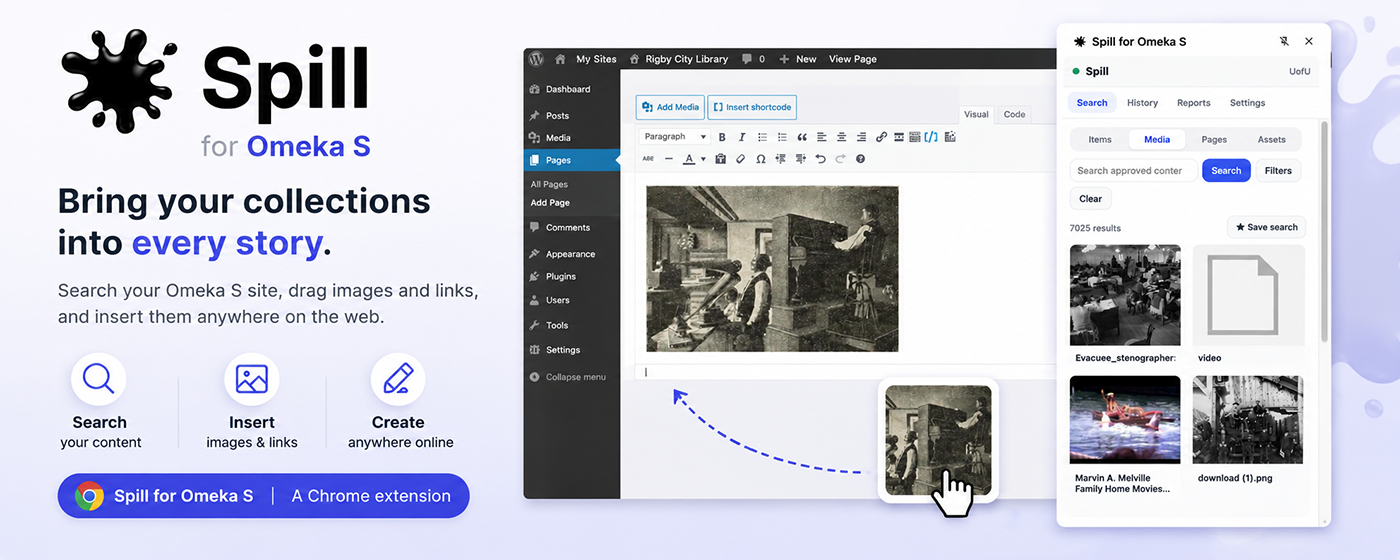
Spill is a browser extension (Chrome and Edge) that opens in a side panel beside whatever you're editing. You search your Omeka S library right there and place an image, file, or link directly into the page you're working on, without leaving it.
What it does, in practical terms:
- One search across your whole instance, covering items, media, site pages, and assets, with filters for item sets, resource classes, and metadata fields.
- Full access to an item's media. Open an item and you can see every file attached to it, then insert or link the specific one you need, not just the first.
- Previews before you commit, for images, video, audio, and PDFs.
- Insert where your cursor is, or copy a clean link or snippet if you'd rather place it yourself. You can pick the size, too: large, medium, square, or the original.
- Saved and recent searches, plus a simple activity view, so repeat work gets faster.
You can connect multiple Omeka S sites and switch between them, which is handy if you run a production and a staging instance, or multiple collections.
A note on access and privacy
Spill works with your public Omeka content, so there are no API keys or passwords to manage. You just point it at your site's address. Your settings and history stay on your own device, and nothing is sent anywhere else. For anyone who has to think carefully about patron data and institutional policy, I wanted that to be true by design, not by promise.
For the technically curious
Under the hood, it's a Manifest V3 extension built with TypeScript, React, and Vite. It's deliberately simple, a focused tool rather than another platform to maintain.
This is the kind of tool that improves by meeting real workflows. If you work with Omeka S, in a library, an archive, a digital scholarship group, or a museum, I'd genuinely welcome your feedback on what fits your day and what gets in the way.