Never Lose a Page Edit: Inside the Page Versioning Module
Anyone who has managed a collaborative website knows the sinking feeling of an accidental edit. A block of carefully written content gets replaced, a page structure gets reorganised the wrong way, and there's no undo button. The Page Versioning module was built to solve exactly that - a complete, automatic revision history for every Omeka S site page, with the ability to browse old versions, compare changes line by line, and restore any previous state with a single click.
Every Save Is Captured, Automatically
There's nothing to configure, no button to click before saving. The module hooks directly into Omeka's Doctrine event system and listens for the moment any SitePage entity is flushed to the database — whether it was just created or updated. The moment a save happens, a complete snapshot of the page is written to the page_versions table: the title, slug, visibility setting, layout, and every content block in its exact position.
One subtlety worth understanding: when you save a page in Omeka, the flush actually triggers events for both the page entity and each of its block entities. Without care, that would produce multiple identical snapshots per save. The module handles this with per-request deduplication — it tracks which (page ID, operation) pairs have already been captured in the current PHP process and silently skips any duplicates. One save, one version, always.
Browsing the History
Every page's version history is accessible at /admin/page-versioning/history/{pageId}, and there's a global audit log at /admin/page-versioning that shows recent changes across every page on the site.
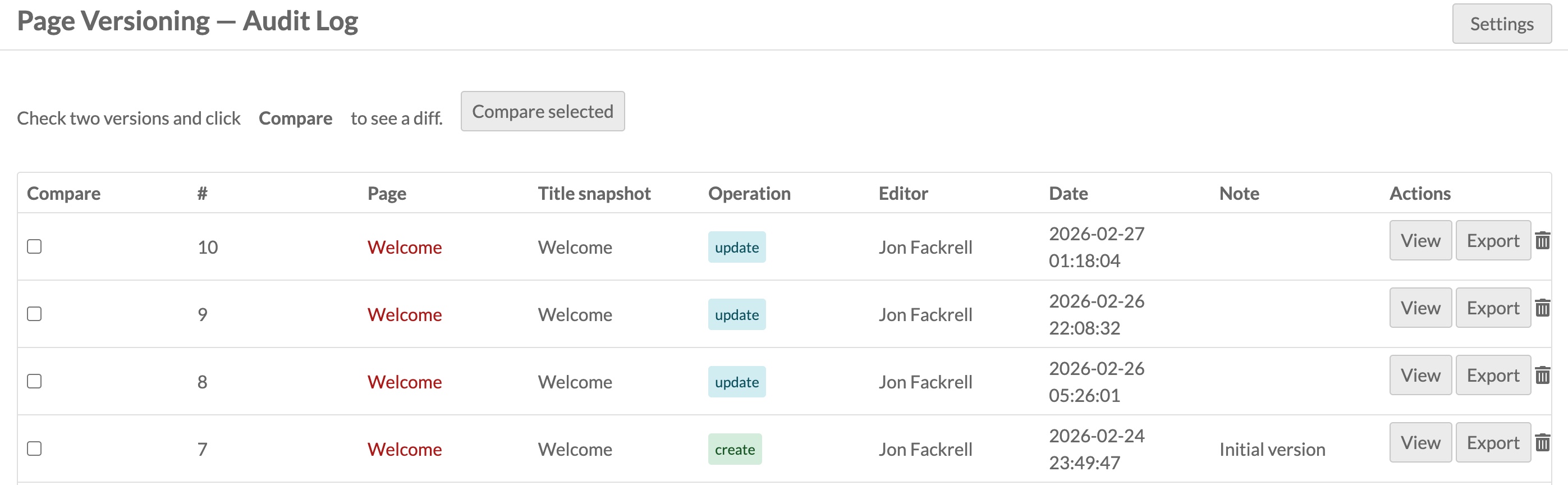
Each row tells you what was changed (create, update, or revert), who made the change and when, and optionally a short summary note if one was supplied. Clicking through to any version opens a read-only snapshot — the exact content of the page at that moment in time. Nothing about the live page is touched by browsing the history; it's purely informational.
Comparing Two Versions
The most useful tool in the module is the diff view. Select any two versions in the history list, click Compare selected, and you get a line-by-line HTML diff showing exactly what changed. Added lines appear in green, removed lines in red.
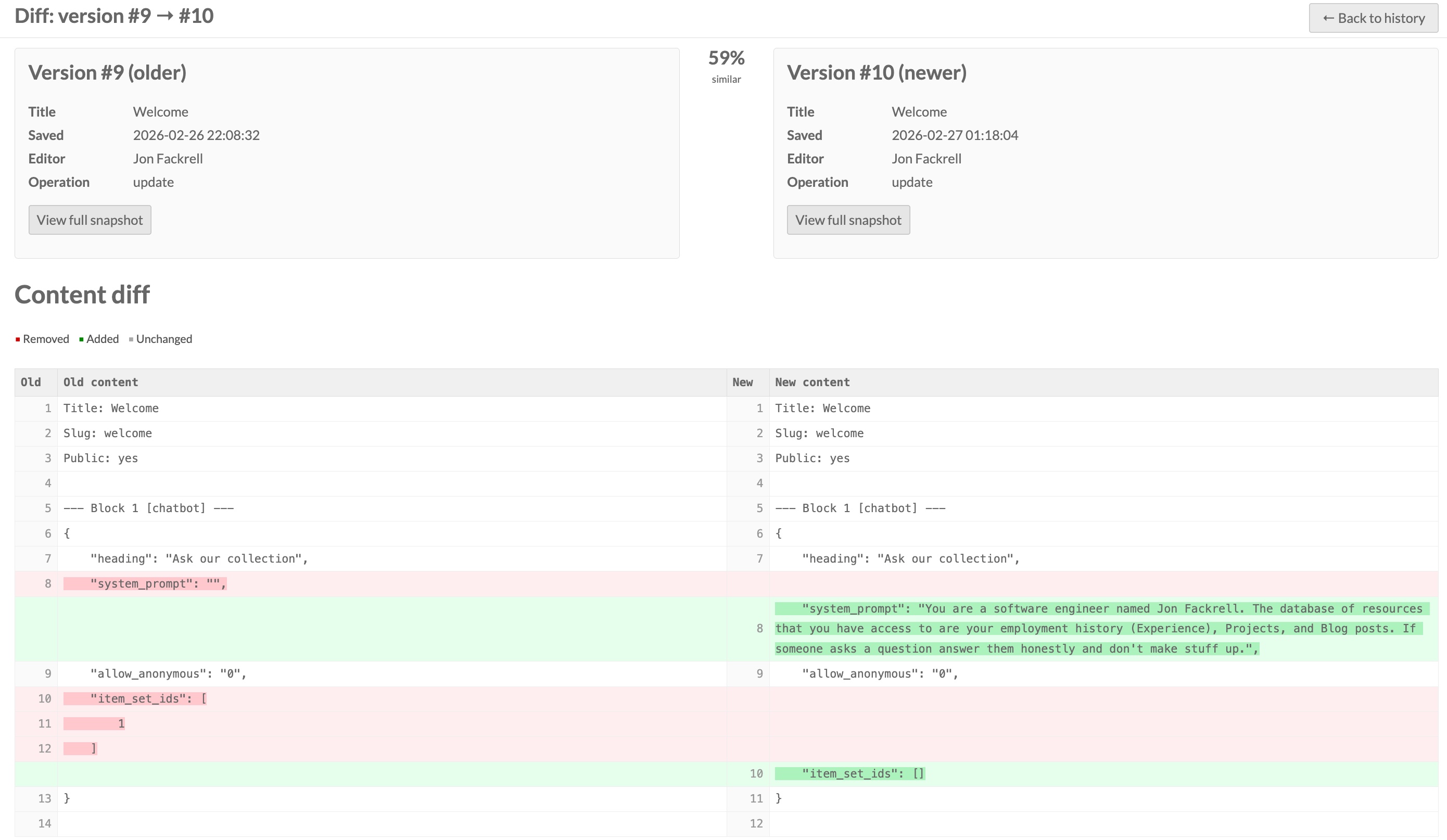
The diff works on human-readable text rather than raw HTML. Before comparing, each version's content is rendered to plain prose — HTML tags stripped, headings and paragraphs converted to newlines — so the diff reflects what a reader would actually see changing, not the underlying markup. A similarity percentage is shown at the top as a quick visual indicator of how much changed between the two snapshots.
The diff engine is implemented from scratch in PHP using the Longest Common Subsequence algorithm, with no external dependencies. It handles pages with up to 5,000 lines and produces properly HTML-escaped output, so code snippets and special characters can't cause rendering problems.
Reverting to an Earlier Version
Any version can be restored with a single click on the Revert button (available to editors and above). The module handles revert carefully to avoid creating a misleading audit trail.
The revert flow works like this: the module sets an internal suppression flag, then calls Omeka's own API to update the live page with the stored payload - title, slug, layout, and all blocks exactly as they were. Because the suppression flag is active, the auto-capture listener sees it and exits without recording anything. Once the API call completes, the suppression flag is cleared, and the module writes a new version row with operation type revert, naming which previous version it restored and when. The revert itself becomes part of the permanent record.
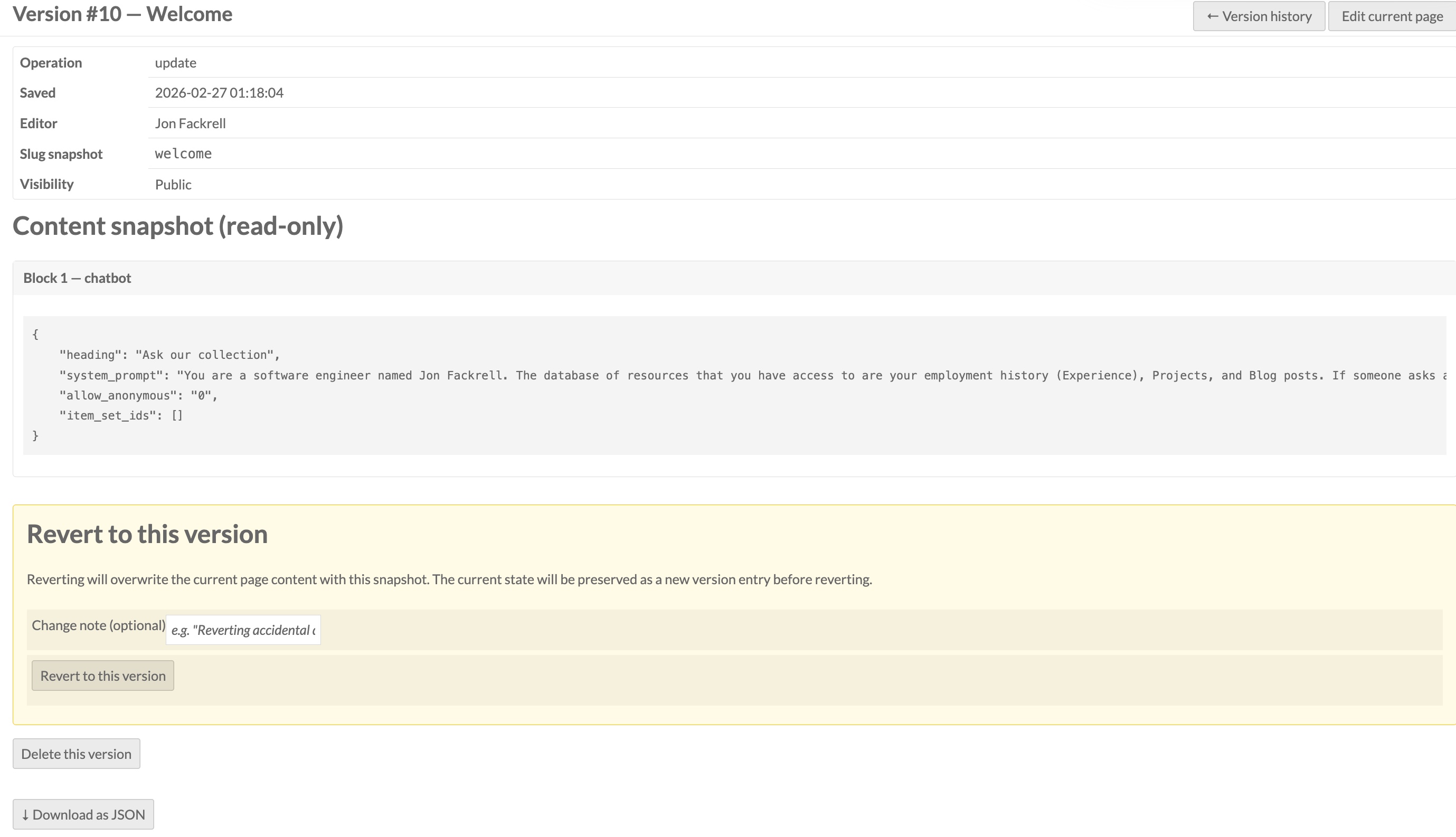
One important detail about how blocks are restored: the stored snapshot does not include block database IDs, which means Omeka's page adapter deletes all existing blocks and recreates them fresh from the payload. This is exactly what the admin page editor does on a normal save, so the restored page is in a clean, fully consistent state.
Retention Policy
Left unchecked, a busy site could accumulate thousands of versions. The module enforces a configurable retention limit — by default, the 50 most recent versions per page are kept. After every new snapshot is written, the oldest rows beyond the limit are automatically deleted. Setting the retention to 0 keeps every version forever.
Importantly, versions for deleted pages are never automatically removed. If a page is deleted from Omeka, its history remains in the page_versions table as a permanent audit trail. The history UI handles this gracefully.
Permissions
The permission model is straightforward. Reviewers and authors can browse history and view old snapshots, but the Revert button is not shown to them. Editors, site admins, and global admins can revert.
What It Doesn't Do
The module tracks site pages specifically. Other Omeka resource types — items, item sets, media — are not versioned. The diff also works at the line level, not the character level within a line; if you change a single word in a paragraph, the entire line will appear as a deletion paired with an addition. For the kind of review typical in a collaborative editorial workflow, this is generally readable enough.